Why ArtifyTales Is Different: AI Storytelling Directed by Kids
ArtifyTales is different from a generic AI studio because it is built around a child’s creative journey—not a single prompt or output. Children can start with a drawing, voice description, written script, handwritten Story Papers, or guided Kiko conversation, then develop the same idea into stories, voices, music, animation, role-play, and learning activities.
By ArtifyTales Team, Nell AI Labs LLC · Published · 13 min read
Most AI creative tools begin with the same request: Type a prompt and let the AI create something for you.
ArtifyTales begins somewhere more meaningful: with something a child has already imagined.
It might be a crayon drawing of a three-eyed dragon. A spoken description of a superhero who is afraid of thunder. A handwritten story spread across several sheets of paper. A script created with a parent. Or a conversation with Kiko that helps a child develop an idea one decision at a time.
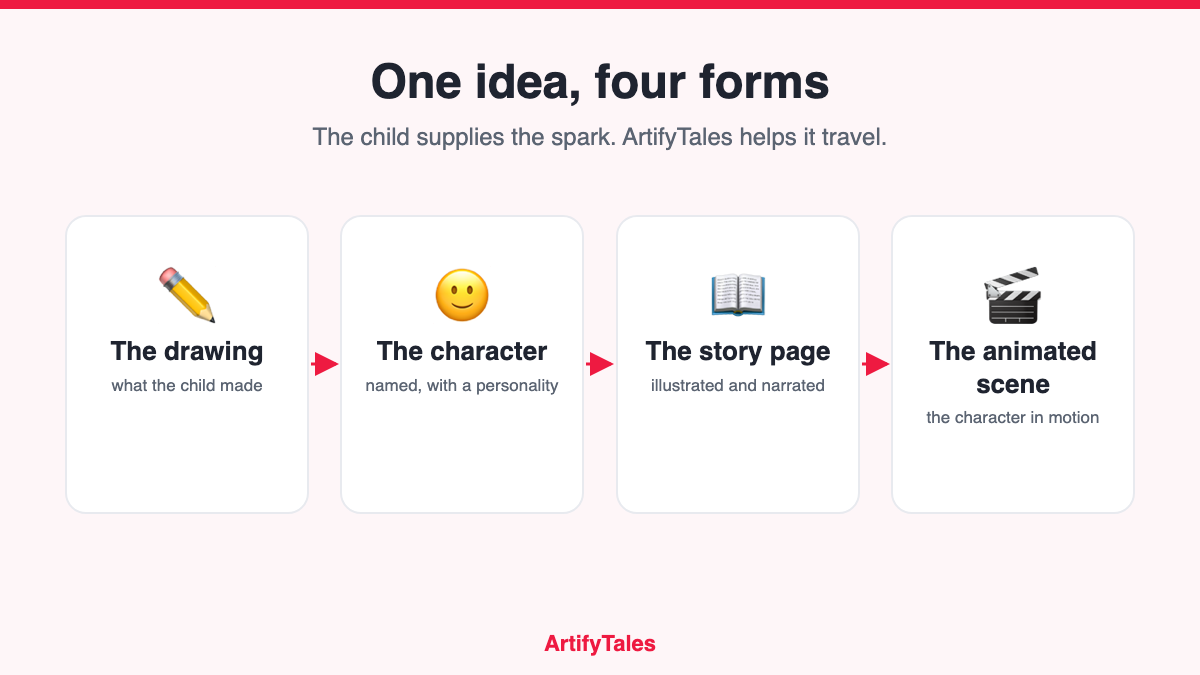
ArtifyTales can then help that original idea become an illustrated story, narration, music, an animated experience, a creative game, or a keepsake the family can revisit.
That difference matters. The child is not simply consuming AI-generated content. The child supplies the spark, makes creative choices, and sees their own idea travel across different forms of expression.
The child creates the source material—not just the prompt
In many general AI studios, the user asks the system to invent the character, the setting, the plot, and the final output. The result may look polished, but the human contribution can be reduced to a short instruction.
ArtifyTales is designed to reverse that relationship.
The starting point can be a child’s own:
- digital drawing or photographed paper drawing
- spoken character description
- written character idea or script
- multi-page handwritten story uploaded as Story Papers; or
- conversation with Kiko, ArtifyTales’ guided creative assistant.
The AI’s role is to help interpret, extend, illustrate, narrate, and animate what the child begins. This is the central ArtifyTales idea: AI should give a child’s imagination more ways to be expressed, not make the child’s imagination unnecessary.
ArtifyTales is a creative loop, not a one-click content machine
A conventional AI story generator often ends when the story appears. ArtifyTales is designed around a longer loop:
- Imagine: The child draws, speaks, writes, or discusses an idea.
- Create: The idea becomes a character, avatar, or story world.
- Experience: The story can be read, heard, watched, or shared.
- Participate: The child can role-play, talk, spell, draw, or play using elements from their own story.
- Remember: The family can return to the creation as a record of what the child imagined at that age.
This makes the product more than an AI story generator. It connects art, oral storytelling, writing, reading, narration, animation, and play around one child-originated idea.
ArtifyTales compared with common AI creative tools
The comparison below describes common product patterns; individual apps may vary.
| Question | General AI studio | Typical AI bedtime-story app | ArtifyTales |
|---|---|---|---|
| Who supplies the original creative spark? | Often the AI after a text prompt | Usually a parent selects a name, theme, or lesson | The child can begin with their own drawing, voice, script, handwritten pages, or guided conversation |
| What can the child create from? | Primarily text prompts or uploaded media | A form with names, interests, and story themes | Drawing board, photo of artwork, voice description, own script, Story Papers, or Kiko |
| What is the main output? | A generated image, text, audio, or video | A personalized illustrated or narrated story | A connected story world that can extend into a book, narration, music, animation, games, role-play, print, and sharing |
| What happens after generation? | The user downloads or edits the asset | The family reads or listens | The child can revisit the story through activities such as role-play, conversation, spelling, coloring, or scene-building |
| Is it designed around children’s developmental differences? | Usually not | Sometimes grouped by reading age | ArtifyTales offers reading-level and K–8-oriented experiences, plus published child-development and Common Core resources |
| Does it support classroom use? | Requires a teacher to assemble multiple tools | Usually optimized for individual bedtime use | One idea can support a draw–plan–write–narrate–reflect classroom workflow |
| Is trust explained for child-created media? | General-purpose privacy policy | Varies by product | ArtifyTales publishes child-focused privacy disclosures, parent controls, deletion options, third-party AI disclosures, and a no-training commitment |
| Can creators and institutions use a broader workflow? | Powerful but fragmented across tools | Usually family-only | Custom plans can address higher-volume production, groups, classrooms, camps, learning centers, and creator workflows |
Why ArtifyTales is different for parents
Parents are rarely searching for “more AI.” They are looking for a rainy-day activity, a better use of screen time, a way to encourage a hesitant writer, a personalized bedtime ritual, or a meaningful way to save the drawings covering the refrigerator.
1. It turns screen time into make-something time
Not all screen experiences ask the same thing of a child. Watching an endless stream of videos is different from drawing a character, explaining its personality, choosing what happens next, and acting out its dialogue.
The American Academy of Pediatrics’ current 5 Cs of Media Use encourages families to consider the individual child, the content, whether media is being used to calm, what it crowds out, and how families communicate about it. ArtifyTales is most valuable when it is used as one creative activity within a balanced day—not as a substitute for sleep, movement, outdoor play, books, drawing on paper, or time with family. See the AAP’s 5 Cs of Media Use.
2. It helps preserve the imagination behind the artwork
A photo preserves what a child drew. A story can preserve what the child believed was happening in the drawing.
That difference is emotional. Years later, a parent may not only remember the purple creature on the page; they can remember its name, its voice, what it feared, where it traveled, and how the child told its story.
3. It creates family participation, not only child-device interaction
A parent can ask questions, help develop the plot, narrate a page, watch the finished story on a larger screen, or share it with grandparents. A family voice can make the experience more personal when the voice feature is used with appropriate consent.
A good starting ritual is simple:
“Draw one character. Tell me three things about it. Let’s turn it into tonight’s story together.”
4. It can make the home language part of the creative experience
Multilingual storytelling can help a child share the same imaginative world with relatives who speak another language or hear a story in the language used at home. ArtifyTales supports story creation and narration in multiple languages. Families should confirm the currently supported language list before beginning a specific project.
Why ArtifyTales is different for children
Children do not all express ideas in the same way. One child may fill a page with drawings but resist writing. Another may tell an elaborate story aloud but struggle with a blank text box. An older child may arrive with a complete handwritten script.
ArtifyTales offers several entry points so the tool can meet the idea where it already exists.
Children can choose how to begin
- A visual thinker can begin with a drawing.
- A confident speaker can describe a character by voice.
- A young writer can use their own script.
- A child who already writes on paper can upload Story Papers.
- A child who needs help getting started can talk through the idea with Kiko.
The child can remain the director
The strongest ArtifyTales sessions happen when adults avoid treating the first output as the final answer. Ask the child:
- Does this look like the character you imagined?
- What should happen next?
- What would the hero say here?
- Should the story be funnier, calmer, or more adventurous?
- Can you draw the next place the character visits?
These questions keep creative judgment with the child.
The story becomes something the child can do
Activities such as Act the Story, character conversations, spelling challenges, drawing, coloring, and scene-building can bring the child back into the world they created. The finished story is therefore not only something to watch; it can become the raw material for another act of speaking, playing, drawing, or writing.
Why ArtifyTales is different for teachers
Teachers do not need another impressive AI demo with no classroom workflow. They need to know what students will make, how long it will take, what materials are required, what the learning objective is, and how student data will be handled.
ArtifyTales is most useful in a classroom when the lesson begins away from the AI.
A practical 45-minute activity: Draw It, Plan It, Tell It
| Time | Student activity | Teacher purpose |
|---|---|---|
| 0–8 minutes | Draw an original character on paper | Idea generation and visual expression |
| 8–15 minutes | Name the character and write its goal, obstacle, and setting | Narrative planning |
| 15–25 minutes | Upload the drawing or use the written/voice entry method with teacher supervision | Translate the student’s concept into a digital character |
| 25–35 minutes | Generate or develop a short story | Practice sequence, description, and revision choices |
| 35–42 minutes | Read, narrate, or perform one scene | Speaking, listening, fluency, and audience awareness |
| 42–45 minutes | Reflect: “What did I create, what did AI add, and what would I change?” | AI literacy and student agency |
The reflection is important. It helps students distinguish between their contribution and the system’s contribution.
ArtifyTales also publishes a Kindergarten–Grade 8 Common Core ELA alignment resource. Teachers should select the exact standard and assessment criteria for their lesson; using the product does not by itself demonstrate that a student has mastered a standard.
Classroom use cases
- literacy week or book day
- art-to-writing projects
- narrative sequence and story structure
- oral storytelling and speaking practice
- multilingual and heritage-language activities
- character, setting, problem, and resolution lessons
- student showcases with appropriate permission
- summer camps, after-school programs, libraries, and makerspaces.
UNESCO recommends a human-centered approach to generative AI in education, emphasizing privacy, age appropriateness, teacher capacity, and human agency. That is a useful standard for any ArtifyTales classroom plan: the teacher defines the objective, the student supplies the ideas and judgment, and AI supports the production process. Read UNESCO’s guidance for generative AI in education.
Why ArtifyTales is different for content creators
A general AI studio may generate excellent individual assets, but creators often have to move between separate tools for character design, scripts, illustration, narration, music, animation, and publishing.
ArtifyTales brings more of that children’s storytelling workflow into one creative environment:
- develop an original character from art, voice, or text
- create a multi-page illustrated story
- add narration and music
- turn story scenes into animation or cinematic clips
- adapt the same world into short-form video, activities, or print-related experiences
- build a recognizable series around recurring original characters.
This can be useful for children’s storytellers, family-content creators, educators who publish learning resources, art instructors, camp operators, and creators building original kid-friendly characters.
Creators should still bring human editorial judgment. Review every script and visual, correct inconsistencies, verify age appropriateness, avoid unlicensed characters or trademarks, and check the current ArtifyTales Intellectual Property Policy, plan terms, and platform rules before publishing or monetizing generated work.
Why ArtifyTales is different for schools and educational institutions
An institution needs more than a family subscription. It may need teacher-controlled groups, appropriate permissions, predictable usage, student privacy documentation, shared libraries, support, and an activity that works with 20 or 30 learners at once.
ArtifyTales can support institution-level experiences such as:
- a “one drawing, one story” library workshop
- a literacy-week story studio
- a language-school project where students create and narrate in different languages
- a summer-camp story film festival
- an art-school showcase connecting illustration and narrative
- a learning-center activity for students who benefit from visual or spoken entry points
- a school pilot that produces consent-approved, anonymized examples and teacher feedback.
Custom school or institution plans should be evaluated around real operational questions: number of students, teacher administration, account setup, permissions, retention, deletion, moderation, support, exports, and pricing. Institutions should request written answers rather than infer school readiness from a consumer app listing.
One drawing can serve five different goals
| Audience | Starting moment | Meaningful outcome |
|---|---|---|
| Parent | A drawing brought home from school | A shared bedtime story and a richer family keepsake |
| Child | An invented creature or hero | A story world the child can read, hear, watch, and perform |
| Teacher | A narrative-writing objective | A draw–plan–write–narrate–reflect lesson |
| Content creator | An original character concept | A repeatable children’s story and media workflow |
| Learning institution | A literacy, art, language, or camp event | A structured group creation and showcase activity |
The product is the same. The job it performs is different for each audience.
Trust is part of the product when children’s media is involved
Children’s drawings, photos, stories, and voices require more care than ordinary creative prompts. The Federal Trade Commission explains that photos, videos, and audio recordings containing a child’s image or voice can be personal information under COPPA. See the FTC’s COPPA guidance.
ArtifyTales’ published Privacy Policy currently describes:
- parent or guardian consent during account creation
- the information used to provide story, image, voice, music, and video features
- third-party AI providers and what is sent to each provider
- a commitment not to use a child’s specific drawings, voice recordings, or personal stories to train public AI models
- deletion and stop-collection rights
- voice-model deletion when a voice profile or account is deleted
- no sale of children’s personal information; and
- contact through
privacy@artifytales.aifor privacy requests.
Parents and schools should read the current policy and choose the minimum information needed for the activity. Avoid uploading unnecessary identifying details, and use voice or photo features only with appropriate adult permission.
ArtifyTales should add to childhood—not automate it
The best measure of a children’s AI product is not how much it can generate. It is what the child is inspired to do before, during, and after using it.
Did the child draw something original? Explain an idea? Make a narrative choice? Read aloud? Perform a character? Revise a scene? Share a story with a parent, classmate, or grandparent? Pick up the crayons again afterward?
When the answer is yes, technology has extended the creative moment instead of replacing it.
That is the most useful way to understand ArtifyTales: not as an AI that tells stories to children, but as a creative studio that helps children turn their own imagination into stories they can see, hear, perform, and share.
Frequently asked questions
- What is ArtifyTales?
- ArtifyTales is a creative AI storytelling studio for children, families, educators, and creators. It can turn a child’s drawing, voice description, written script, handwritten Story Papers, or guided Kiko conversation into illustrated and narrated story experiences.
- How is ArtifyTales different from an AI story generator for kids?
- Many AI story generators begin with a parent-entered prompt and end with a story. ArtifyTales supports multiple child-created inputs and lets the same idea continue into narration, music, animation, role-play, creative games, print-related activities, and sharing.
- Can ArtifyTales turn my child’s drawing into a story?
- Yes. A child can draw digitally or upload a photo of artwork, develop the drawing into a character, and use that character in an illustrated story with optional narration, music, and animation features.
- Does ArtifyTales replace children’s creativity with AI?
- It should not. The strongest workflow starts with the child’s drawing, voice, or writing and keeps the child involved in character, plot, style, and revision choices. Parents and teachers should treat AI output as material to discuss and improve, not as the child’s finished work automatically.
- Can teachers use ArtifyTales in a classroom?
- ArtifyTales can support art, narrative writing, speaking, listening, multilingual storytelling, and AI-literacy activities. Teachers should review privacy and consent requirements, choose a specific lesson objective, supervise generation, and use a rubric that evaluates the student’s own thinking and decisions.
- Can children create stories in different languages?
- ArtifyTales supports story creation and narration in multiple languages, which can help bilingual and multilingual families and language-learning programs. Check the product’s current supported-language list for the exact language needed.
- Can content creators use ArtifyTales?
- ArtifyTales can help creators develop original characters, illustrated stories, narration, music, and animated media in a connected workflow. Before commercial use, creators should review their current plan, ArtifyTales’ terms and IP policy, and the rules of the publishing platform they use.
- Is ArtifyTales safe for children?
- ArtifyTales publishes parent controls, child-focused privacy disclosures, age-appropriate content commitments, deletion options, and a no-training commitment for a child’s specific creations. Safety also depends on adult supervision, using minimal personal information, reviewing generated output, and following school or family consent rules.
- What ages or grades is ArtifyTales designed for?
- ArtifyTales presents experiences and educational resources spanning early childhood through Grade 8, but adult support and the best creation method will vary by age. Younger children may benefit from drawing and shared narration; older children may use scripts, Story Papers, Kiko, editing, and reflection more independently.
Ready to turn one drawing into a whole story world?
Ask your child to draw one character tonight. Give it a name, a goal, and one surprising problem. Then bring that idea to ArtifyTales and see where your child directs the story.
Parents and families can also use ArtifyTales on iPhone and iPad or Android.
Teachers, schools, libraries, learning centers, camps, and content creators can contact the ArtifyTales team to discuss a pilot or custom plan.